

Word add-in
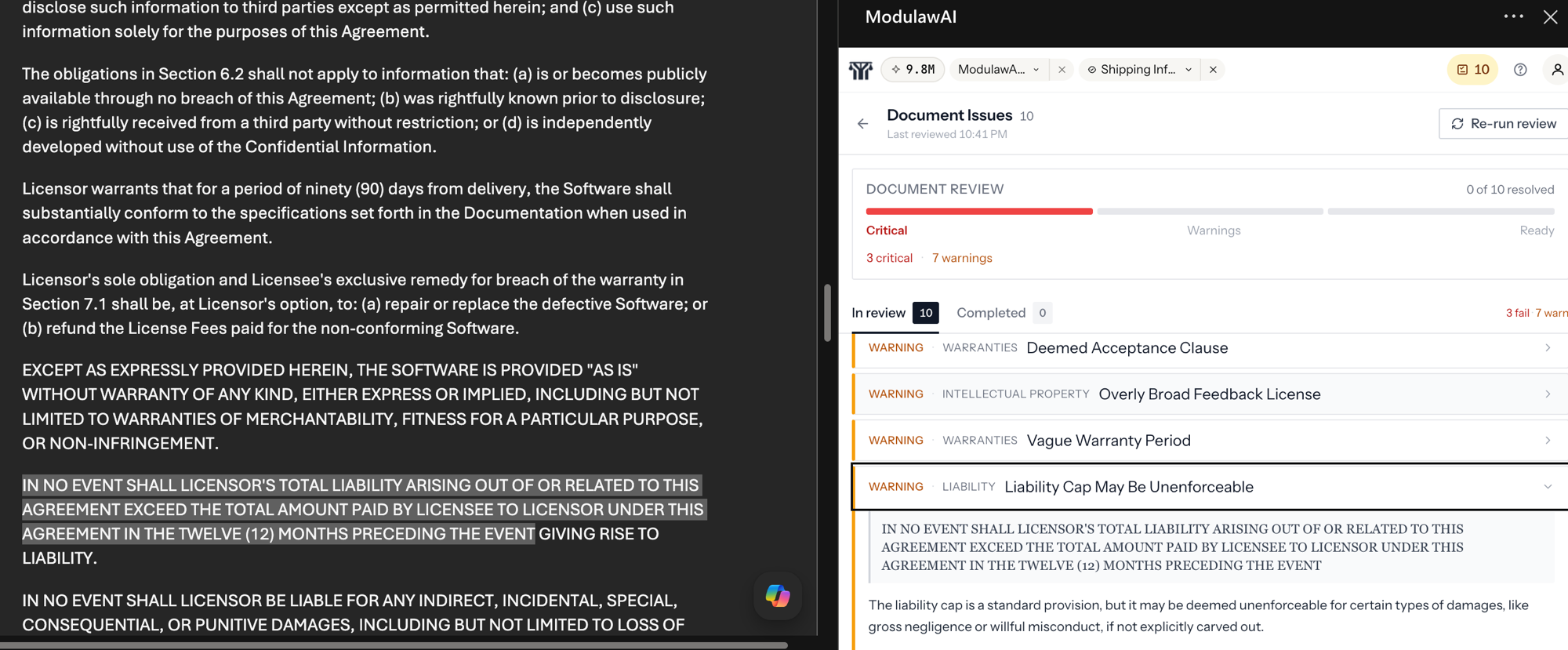
ModulawAI inside the document.
Draft, redline, cite, and research without leaving Microsoft Word. Every change tied back to the matter and the audit trail.
0
App-switching required
Live
Sync with the matter
Word
Native on macOS and Windows
Cite
Authority drop-in
Capabilities
What’s inside.
Drafting assist
Generate clauses, sections, and full first drafts against the matter context, inside Word, in the firm's style.
Redline suggestions
Track-changes-style suggestions surfaced inline, accept or reject one at a time or in batches.
Citation drop-in
Search authorities in the side panel and insert them at the cursor with jurisdiction-correct formatting.
Matter context
The add-in knows which matter you're drafting against and reads its facts, parties, and prior documents.
Tone and clause modes
Switch between strict, persuasive, and conservative tones. Switch between drafting and review modes.
Jurisdiction-aware
The add-in respects your jurisdiction for citation format, statutory references, and stylistic conventions.
Audit logged
Every AI action inside the document is logged against the matter — what was suggested, what was accepted.
Office 365 and desktop
Works in Word on macOS, Windows, and Word for the web. Single sign-on with your ModulawAI workspace.
In depth
A closer look.
Workflow
Drafting at the speed of thought.
Open Word. Open a matter's draft. The side panel knows the matter, knows the parties, knows the prior filings. Ask it to draft a section. Review the suggestion. Insert. Cite. Move on.
- Inline suggestions you can accept, reject, or refine
- Side-panel research that pastes citations at the cursor
- No copy-paste between Word and a separate chat tool
Compliance
Every change, accountable.
Every AI-generated suggestion is attributed. Every accepted change is logged against the matter. Every cited authority is recorded. The audit trail your firm needs lives alongside the document, not separately.
FAQ
Questions, addressed.
How do I install it?
Install ModulawAI for Word from the Microsoft AppSource listing at marketplace.microsoft.com/en-us/product/saas/wa200010779, then sign in with your workspace credentials. Most firms are running it in under five minutes.
Does it work on Word for the web?
Yes. Word desktop on macOS and Windows, plus Word for the web. Same feature set.
Is my document content sent to AI providers?
Only the content needed to answer your prompt, and only routed through providers your firm has approved. Nothing trains a model. Nothing leaks across firms.
Can I use it offline?
The add-in needs a connection to query the model and the matter context. Word's offline drafting works as it always has — the AI features just wait for connectivity.
See it against your matters.
Start free in minutes, or book a demo and we’ll run it on your firm’s real work.